

The client says, ‘I need all the leads and customer information in CSVs for report and analysis purposes.’ So, we export the CSVs every week manually, and those records are pushed to the Google Sheet. However, there is another boom, I also want leads/customer information at the same time when it is created in pre-sales platform.
I didn’t plan to integrate Zapier, but the requirement formally pointed to Zapier. Because it’s just one case (platform to Google Sheet), however, Zapier opens avenues for 1000+ applications that can be integrated with your platform.
Zapier looks like the answer to move forward… until I realized that Zapier expects an OAuth 2.0 authorization flow, while our platform uses JWT-based authentication for its own APIs.
JWT is only a token format, not an authentication protocol, and Zapier does not provide a built-in way to perform JWT-based login flows like it does for OAuth 2.0. That meant I needed a way to expose an OAuth-compatible interface without rewriting our existing authentication system.
Platform Context – Our Tech Stack
- Backend: Spring Boot – java + JWT (Authentication Mechanism)
- Frontend: ReactJS
- Token: JWT
Default supported Authentication Schemes by Zapier:
Where our application was build through JWT and Zapier does not support JWT as a first-class authentication flow like OAuth2
Problem
Our backend handles JWT authentication/token, and Zapier does not! So I had two choices:
- Rewrite our auth system (No thanks.)
- Handle JWT token in Zapier with custom auth which requires code that validate token in Zapier itself
None of the options looks accurate in the application, so I need to find a bridge, and that’s where I found ORY Hydra (an open-source OAuth 2.0 and OpenID Connect server that handles authentication and authorization for applications). Why ORY Hydra? Go to my other blog regarding Ory Hydra vs other OAuth 2.0 token providers
The First Big Roadblock – Authentication
Step 1: Zapier error:
OAuth2 token details (ClientId, ClientSecret, Access/Refresh token URLs) are missing or invalid
Step 2: So here’s how I hacked it:
Solution: Introducing ORY Hydra as OAuth Layer
First, I need to create a client in the Ory Hydra platform, or you can host it somewhere in your platform, because it is open source. To create a client in the Ory Hydra platform using cli:
hydra clients create \
 --id my-zapier-client \
 --secret secret123 \
 --grant-types authorization_code,refresh_token \
 --response-types code \
 --scope openid,offline
Using REST APIs, you can also create clients and update them. Also, add the redirect URL (provided by Zapier) to handle Authentication.
Here are some details that need to be understood before moving forward:
| Client id | It’s id (unique id) generated by Ory Hydra to go with specific client information. |
| Client secret | Need to generate a specific length string for that client (something like a password) |
| Redirect URLs[] | It’s an array of strings (URLs) when there is a request happens for authentication, where should be redirected after successful authentication |
| grant-types | authorization_code or refresh_token both should be there as Zapier needs a client that can grant both authorization and refresh. |
| response-types | It should be ‘code’ as it is a backend process handled by Zapier. |
You can find out more on Ory Hydra Create Client REST API here
The Second Roadblock – Open Source means Open APIs
I have started working with the Ory Hydra open-source platform, which is hosted on the server. Ory Hydra provides separate admin APIs and public OAuth APIs.
The admin APIs (used to create clients and manage authentication flows) must be protected and should never be exposed publicly. Instead of exposing Hydra’s admin endpoints directly, I placed them behind our Spring Boot backend(Wrapper APIs) so that only our application could call them.
Solution: Wrapper APIs
To solve that, I created wrapper APIs in our Spring Boot backend Application with the help of Ory Hydra Java SDK.
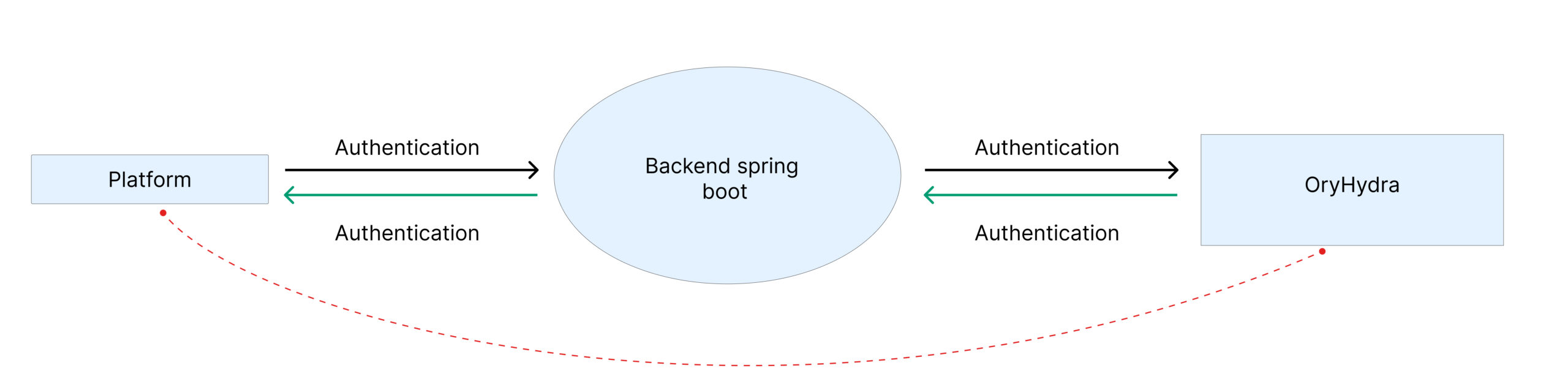
While calling our Ory Hydra server, there is a specific code added in the header that will be validated before going to the server, so that our Ory Hydra server can be secured.
So I need to create 4 wrapper APIs as Zapier needs: Authentication Initialization, Accept Login challenge, Accept consent, and token generation that have the updated secured header code.
The Third Roadblock – Handling Two Authentication Mechanisms
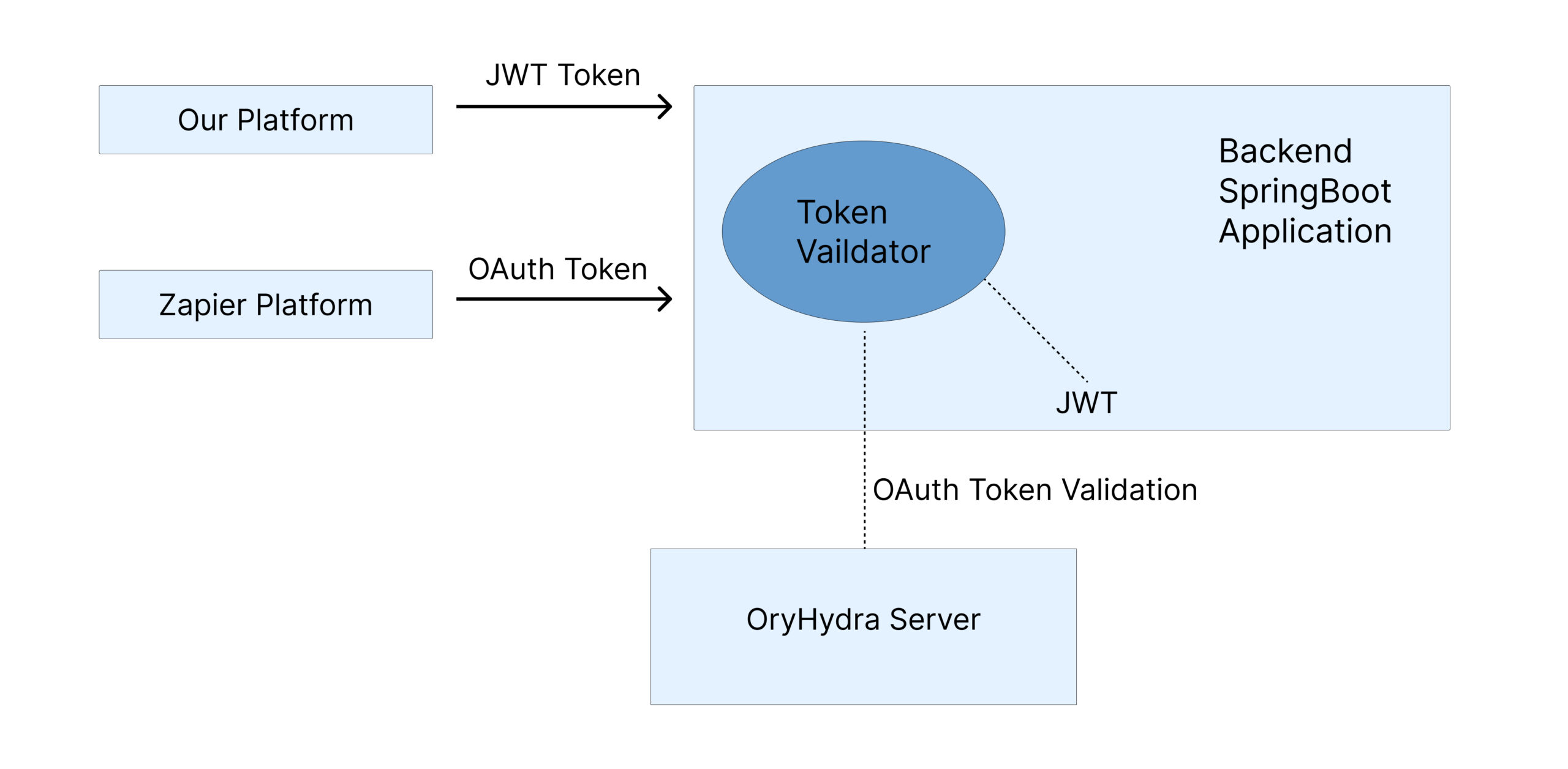
Now, the next block is our Backend Spring Boot Application can validate only JWT tokens and give access to the data if the JWT token is valid. At the other end, while communicating with Zapier, they are sending an OAuth token to gather the data.
Solution: Update Token Validator Method
Since our backend now had to support two token issuers (JWT from our own platform and OAuth tokens from Ory Hydra), the token validation logic had to handle both.
When a request arrives, the backend determines whether the token should be validated against Hydra (via token introspection) or validated using our existing JWT verifier. This allows the same API endpoints to be accessed securely by both Zapier and our internal frontend.
Result:
Our platform now can have both the capability to handle JWT & the OAuth token mechanisms, and Zapier can now have access to our database. Next steps: Create Trigger => Create APIs to handle requests in Spring Boot Application => validate token => give response with the required data => Zapier.
Outcome
After going live (production):
- Shops could connect our platform with Google Sheets, Google Calendar events, etc.
- No more CSV exports or manual jobs
- Data synced instantly to customer’s existing system when a lead or job was created
- The internal team gained a reusable OAuth setup for future integrations
And best of all we didn’t rewrite our auth system or compromise of existing users.
Final Thoughts (Dev to Dev)
If you’re building your first Zapier integration, here’s my biggest advice:
“Don’t start with the Zapier UI. Start with your authentication model.”
Zapier will happily connect once it gets a valid token, but it won’t help you figure out how to get there. I spent more than a week on debugging OAuth and 3 hours building triggers.
In the end, it’s worth it.
Because once you connect your app to Zapier, your users gain automation superpowers – and your API suddenly becomes part of 10,000+ workflows.